Domain 2 Question Set: Azure Architecture and Services
Domain 2 is the most critical section of the AZ-900 exam. It accounts for 35% to 40% of the total score. You must master these concepts to pass the certification.
This domain covers a significant amount of information. It ranges from the physical infrastructure of data centers to specific services like Compute, Networking, Storage, and Identity Security.
To ensure you understand every detail, We have split this domain into two separate guides.
Part 1: Core Architecture, Compute, and Networking This Question Set is Part 1. We will focus on the foundational building blocks of the Azure cloud. You will learn about the physical layout of Azure and the services that run your applications.
In this Question Set, we cover:
- Core Architectural Components: Regions, Region Pairs, Sovereign Regions, Availability Zones, and Datacenters.
- Management Hierarchy: Resources, Resource Groups, Subscriptions, and Management Groups.
- Compute Services: Virtual Machines, Virtual Machine Scale Sets, Containers, Functions, and Azure Virtual Desktop.
- Networking: Virtual Networks, Subnets, DNS, VPN Gateways, ExpressRoute, and the difference between Public and Private endpoints.
Part 2: Storage, Identity, and Security (Coming Soon) The next Question Set will cover the remaining topics in Domain 2. That Question Set will focus on:
- Storage Services: Storage accounts, tiers, redundancy, and migration tools.
- Identity and Access: Microsoft Entra ID, Multi-Factor Authentication, and Conditional Access.
- Security: Zero Trust, Defense-in-Depth, and Microsoft Defender for Cloud.
Let’s begin with Part 1 and review the core architecture and compute services.
Scenario: Contoso, Ltd. is deploying a critical financial application on two virtual machines. Most users are located in the Azure East US 2 region.
Goal: Recommend a deployment solution that meets all requirements:
- Remain available even if an entire datacenter fails
- Maintain minimal network latency between instances
- Guarantee separate fault and update zones
C. Separate availability zones
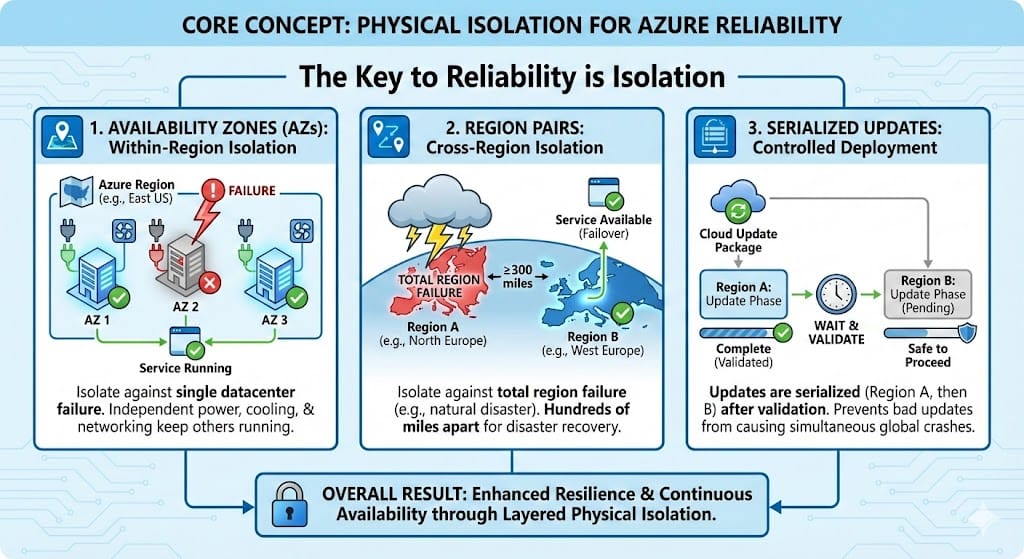
Azure provides multiple availability constructs, each designed to protect against a different scope of failure. As protection increases, physical distance increases, which directly impacts network latency.
-
Availability Sets
Protect against hardware failures within a single datacenter. They offer very low latency but do not survive a facility outage. -
Availability Zones
Protect against datacenter failures. Zones are physically separate datacenters within the same Azure region, isolated for power and cooling, yet connected by high speed, low latency Microsoft fiber. -
Region Pairs
Protect against regional disasters. Resources are replicated hundreds of miles apart, which significantly increases latency.
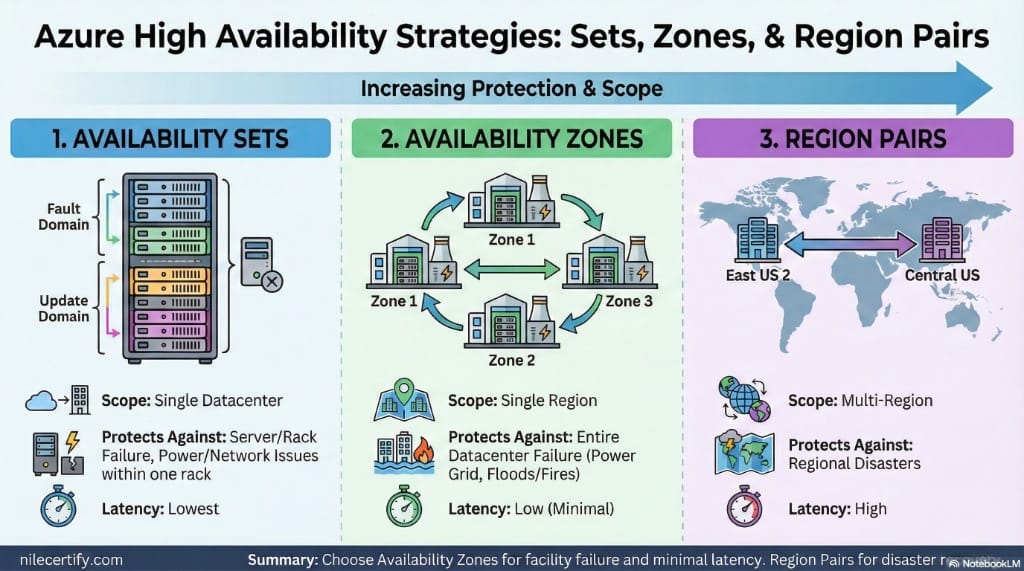
Protection scope increases from left to right, while network latency also increases.
In this scenario, Availability Zones are the only option that survive a full datacenter outage while still meeting the low latency requirement.
A. Separate resource groups
Resource groups are management containers. They do not control physical placement or availability.
B. Separate availability sets
Availability sets protect against rack or host failures only. They do not protect against a full datacenter outage.
D. Separate regions in a regional pair
Regional pairs introduce significant latency due to geographic distance, which violates the minimal latency requirement.
Goal: For each of the following statements, select Yes if the statement is true. Otherwise, select No.
- Statement 1: Yes. Resource Groups are logical containers. The location of the container (metadata) does not dictate the physical location of the resources inside it.
- Statement 2: Yes. Resources interact via networks and APIs. They do not need to be in the same “folder” (Resource Group) to talk to each other.
- Statement 3: No. A ReadOnly lock is restrictive. It prevents both deleting and modifying resources. To allow updates but prevent deletion, you would use a CanNotDelete lock.
To master this topic, you must separate the Management Plane (The Resource Group) from the Data Plane (The Resources).
1. The “Inventory List” Analogy
Think of a Resource Group as a physical clipboard holding an inventory list.
- You can keep the clipboard in your New York office (East US Region).
- The actual equipment on the list can be stored in a warehouse in London (West Europe Region).
- Where you keep the list does not force you to move the equipment. This is why RG location and Resource location are independent.
2. Interaction Borders
Resource Groups are management boundaries, not security walls. A Virtual Machine in Group A can talk to a Database in Group B freely, provided their network settings allow it. The Resource Group does not block traffic.
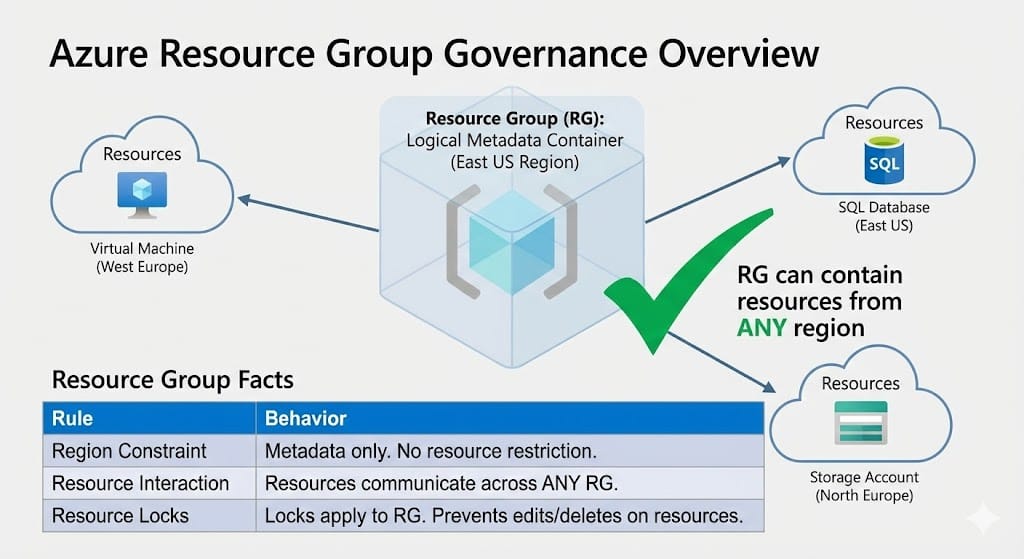
Visualizing the separation between Logical Grouping and Physical Location.
- Marketing must receive its own separate monthly invoice.
- Sales and IT expenses must be combined onto a single invoice to simplify accounting.
- Sales administrators must be strictly prevented from modifying any IT resources.
B. Two
To answer this, you must solve for the “Pivot Point”: What triggers a new invoice?
1. The Billing Rule:
An Azure Subscription is a billing unit. If you need a separate invoice (a distinct document requesting payment), you must create a separate Subscription.
• Marketing needs a separate invoice → Subscription 1.
• Sales and IT share an invoice → Subscription 2.
2. The Security Rule:
A Subscription is not required to separate permissions. You can place Sales resources in “Resource Group A” and IT resources in “Resource Group B” inside the same subscription. You then use Role-Based Access Control (RBAC) to build a “wall” between them.
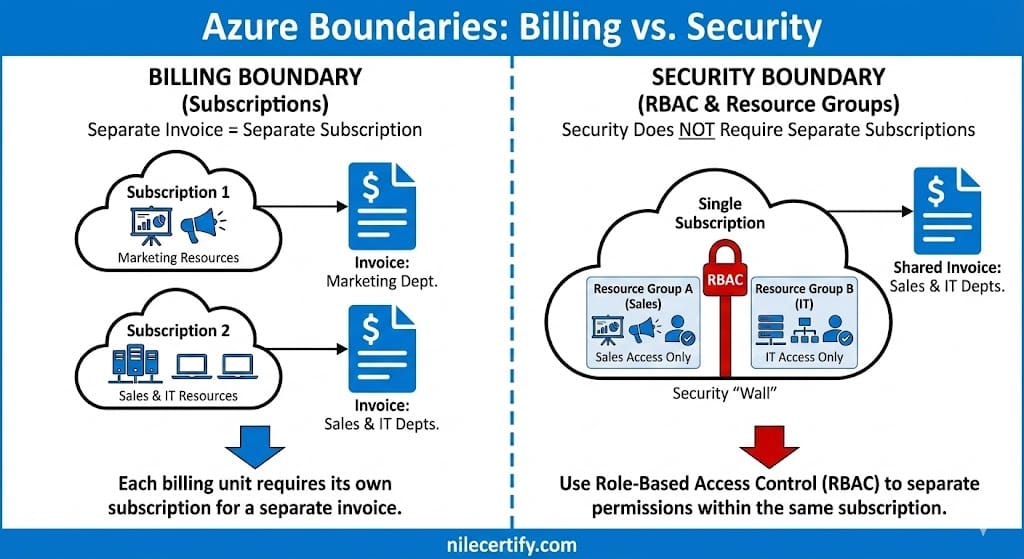
Visualizing the separation between Billing (Subscription) and Security (RBAC) boundaries.
Total Minimum Subscriptions: 2.
A. One
This violates the billing requirement. If you put all three departments in one subscription, you generate a single invoice. Marketing would not receive their own separate bill.
C. Three
This is a valid configuration, but it is not the minimum. You could create a separate subscription for Sales and IT, but since they want to share an invoice, it adds unnecessary management overhead.
Goal: Choose the Azure component that best satisfies each of the following requirements.
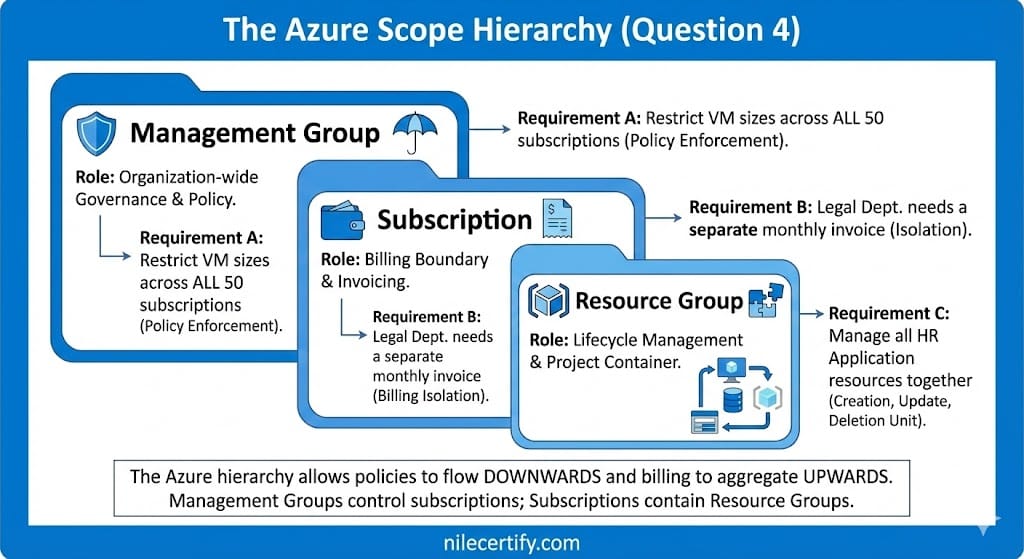
Goal: Validate the technical accuracy of the following architectural statements.
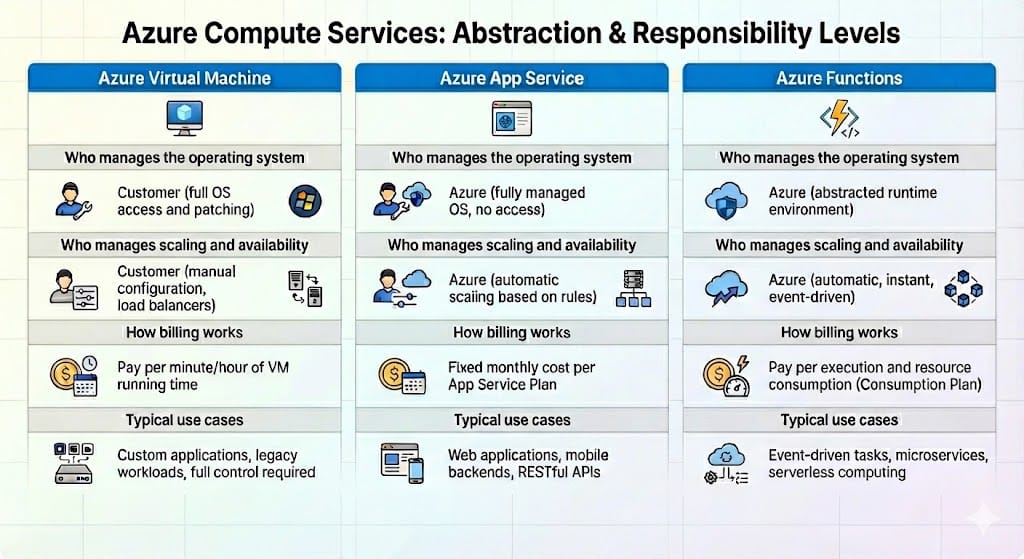
Azure compute services are distinguished by how responsibility is divided between the customer and Azure. As abstraction increases, Azure assumes responsibility for more layers of the execution environment, while the customer focuses primarily on application logic.
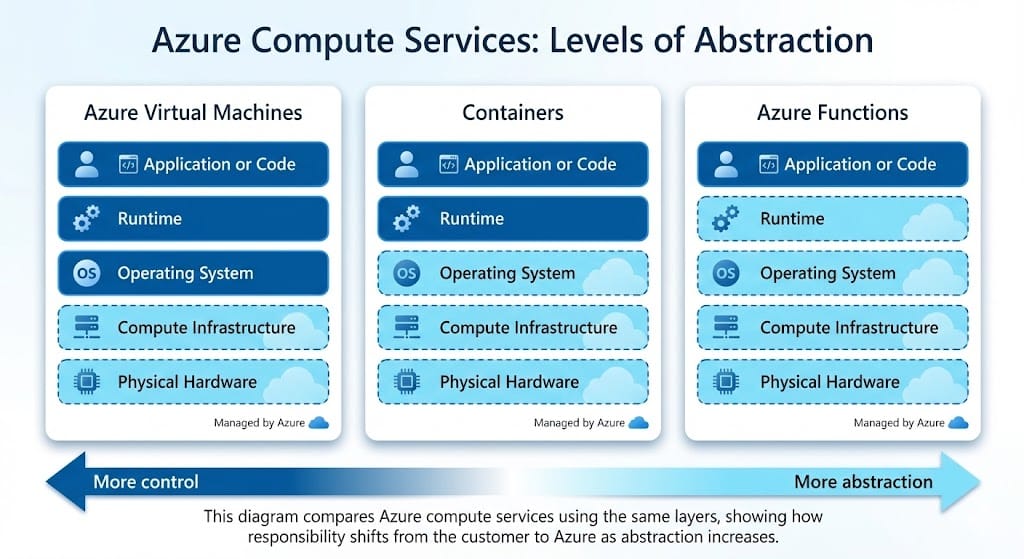
This diagram highlights how management responsibility shifts across virtual machines, containers, and serverless compute.
Statement 1: Yes.
Azure Functions use a serverless execution model. Azure manages the operating system and scaling behavior automatically.
Statement 2: Yes.
Virtual machines expose the operating system, which makes the customer responsible for updates, patching, and configuration.
Statement 3: No.
Containers share the host operating system kernel and do not require a separate guest operating system for each container.
Azure networking services solve different problems. Connectivity is how traffic flows between resources. Name resolution is how resources find each other by name. DNS maps names to IP addresses, it does not create network connectivity.
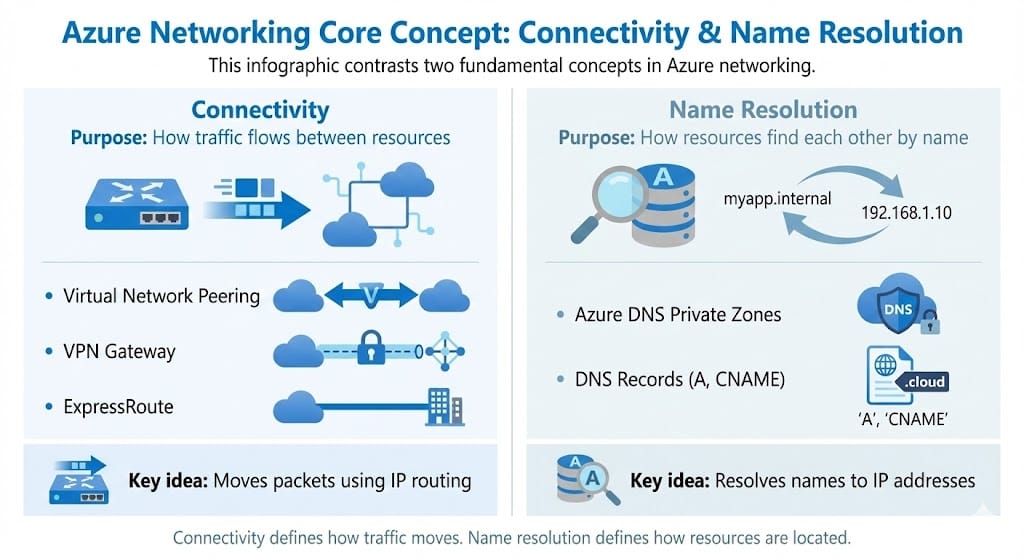
Connectivity moves traffic. Name resolution maps names to IP addresses.
Row 1: Azure Virtual Network peering.
Peering provides private IP connectivity between VNets inside Azure without deploying gateways.
Row 2: ExpressRoute.
ExpressRoute provides a private dedicated connection from on premises to Azure that does not traverse the public internet.
Row 3: Azure DNS private zones.
Private DNS zones provide internal name resolution in a VNet. They do not provide routing or connectivity.
Public and private endpoints describe how a service is reached on the network. They do not describe what the service does. This is why the same Azure service can support both a public endpoint and a private endpoint, depending on how you want clients to connect.
A public endpoint means the service is reachable over the public internet, typically through a public DNS name and public routing. A private endpoint changes the exposure model by mapping the service to a private IP address inside a virtual network, so connectivity stays private from the client perspective.
Private endpoints often rely on DNS integration so that the service name resolves to the private IP. In many environments, you must configure Private DNS zones or your own DNS so clients resolve the private address instead of the public one.
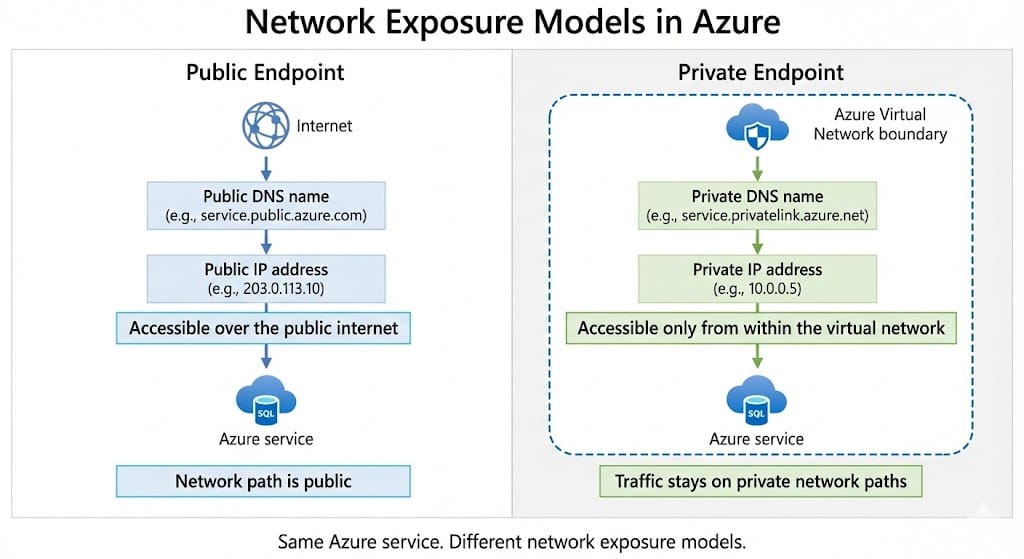
Same Azure service, different network exposure model based on the endpoint type.
Statement 1: Yes. A public endpoint makes a service reachable over the public internet.
Statement 2: Yes. A private endpoint exposes the service through a private IP address in a virtual network, changing how clients reach it.
Statement 3: No. DNS may require configuration so the service name resolves to the private IP address when private endpoints are used.
Goal: You need to improve performance by increasing available compute and memory on the existing virtual machine. The application architecture does not support running on multiple servers.
When a workload runs on virtual machines, there are two ways to add capacity. You can increase resources on the same machine, or you can add more machines and distribute the workload. The deciding factor is whether the application can run across multiple servers.
Vertical scaling, scale up, increases CPU and memory on the existing virtual machine, typically by resizing it to a larger VM size. This is the right approach when the application must remain on a single server.
Horizontal scaling, scale out, adds more virtual machines and spreads traffic across them using load balancing or services like Virtual Machine Scale Sets. This only works when the application supports multiple instances.
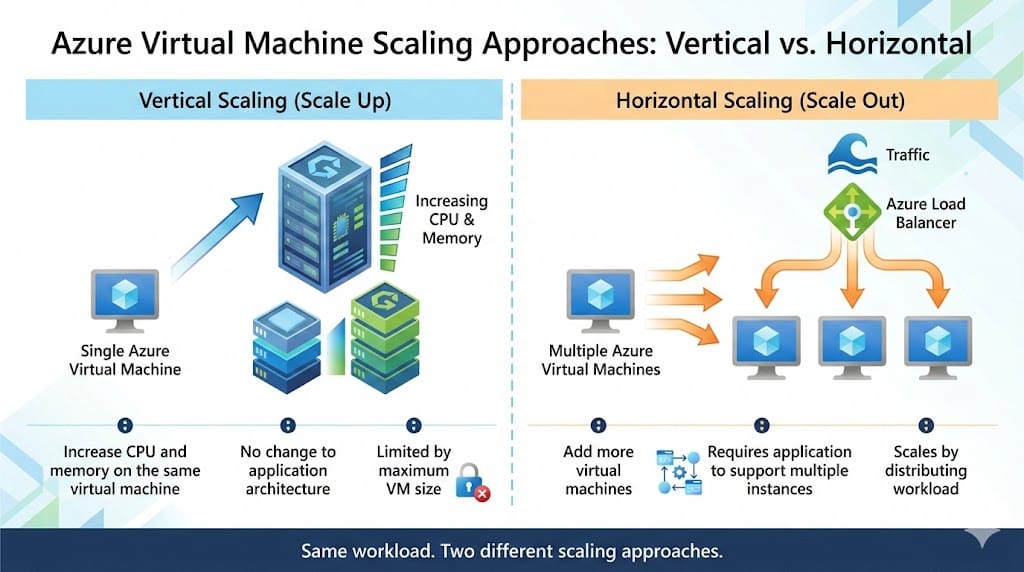
Scale up increases resources on one VM. Scale out adds VMs and distributes the workload.
B. Resize the virtual machine to a more powerful SKU
A. Add another virtual machine and distribute traffic across both machines
This is horizontal scaling. It requires the application to run on multiple servers, which the scenario says is not supported.
C. Enable Azure Virtual Machine Scale Sets
Scale Sets are designed to deploy and manage multiple VM instances for scale out. They do not increase CPU or memory for a single existing VM.
D. Migrate the application to Azure App Service
This changes the hosting platform and can require redesign or refactoring. It does not directly satisfy the requirement to increase compute and memory on the existing virtual machine.
Stay Updated
Join our mailing list to receive notifications regarding:
Az-900 Exam Practice Questions & Updates
Enter your email below to ensure you never miss essential Azure exam information.