The Microsoft Azure Fundamentals exam covers three specific domains. The first domain is Describe Cloud Concepts. This section represents 25% to 30% of your total score. It focuses on the fundamental principles of cloud computing that apply to any provider.
You must understand the core definitions and why organizations move to the cloud. This includes knowing the differences between public, private, and hybrid models. You also need to understand the shared responsibility model for security tasks. The exam requires you to define service types like IaaS, PaaS, and SaaS. Finally, you must explain key benefits like high availability and elasticity.
This domain covers the following key areas:
- Cloud models including Public, Private, and Hybrid
- Cloud benefits such as High Availability and Scalability
- Service types including IaaS, PaaS, and SaaS
- The Shared Responsibility Model
Goal: You want to migrate your public-facing website to Azure to save costs. However, strict industry regulations require that your customer database remain on your local servers for security. The website in Azure must be able to communicate with the database on your local servers.
The exam requires you to choose the right model based on where the infrastructure lives and who manages it.
| Model | Description | Best For… |
|---|---|---|
| Public Cloud | Services offered over the public internet and available to anyone who wants to purchase them. Resources are owned by the provider (Azure). | Startups, web apps, and saving money (OpEx). No maintenance required. |
| Private Cloud | Computing resources used exclusively by a single business. It can be located physically at your on-site datacenter. | Legacy apps and strict security compliance that forbids public data storage. |
| Hybrid Cloud | A computing environment that combines a Public Cloud and a Private Cloud by allowing data and applications to be shared between them. | Organizations that must keep some data on-premises (for law/compliance) but want to use the cloud for other apps. |
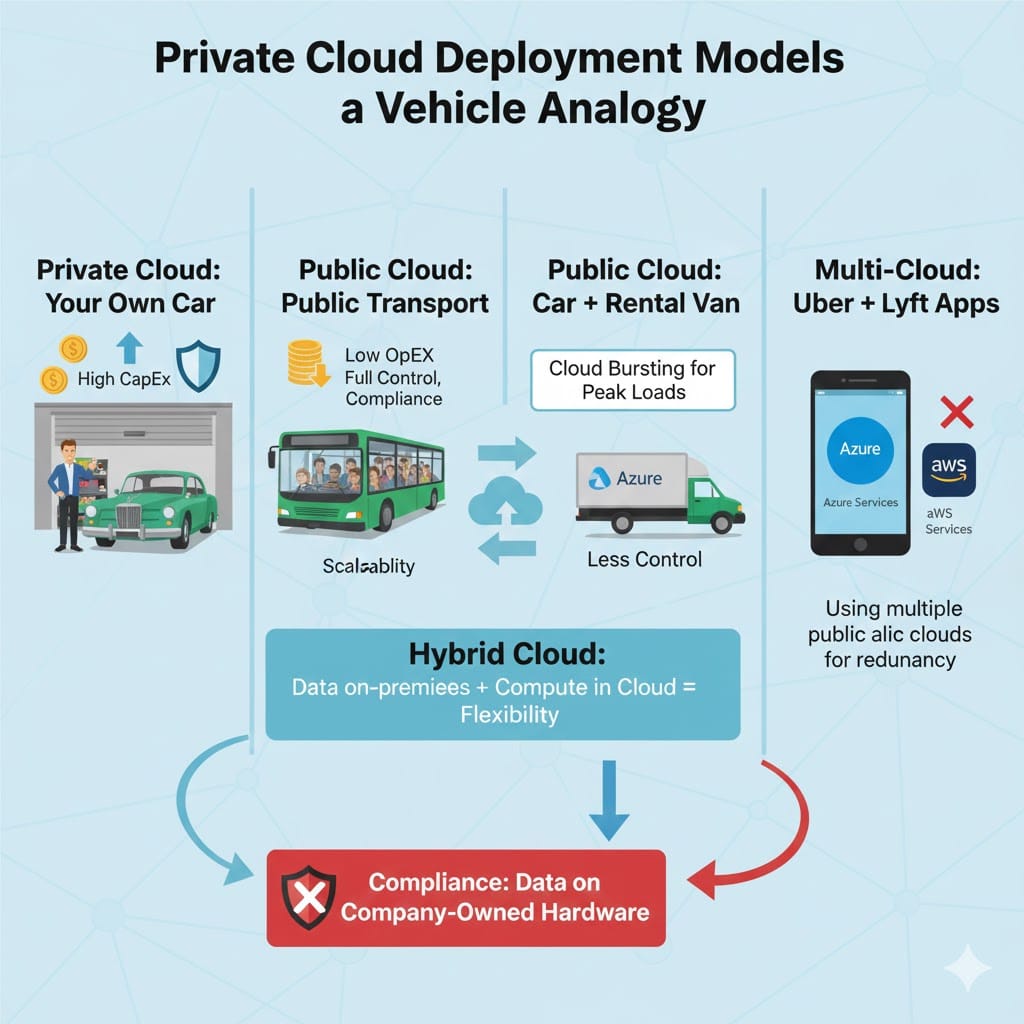
In this scenario, you are using Azure (Public) for the website and your Local Datacenter (Private) for the database. Because you are connecting them together to work as one system, this is the definition of a Hybrid Cloud.
Option A (Public cloud):
This is incorrect because you are keeping the database on your own local servers. A purely public cloud solution would require moving everything to Azure, which violates your regulation.
Option B (Private cloud):
This is incorrect because you are moving the website to Azure. A purely private cloud solution would mean keeping everything in your local datacenter.
Option D (SaaS):
SaaS (Software as a Service) is a service model (like Microsoft 365 or Gmail), not a deployment model. It refers to using software, not hosting infrastructure.
Goal: You need to recommend a cloud service type that minimizes administrative effort for the development team.
The Shared Responsibility Model determines which tasks are handled by Microsoft and which are handled by you. The burden shifts depending on the service type:
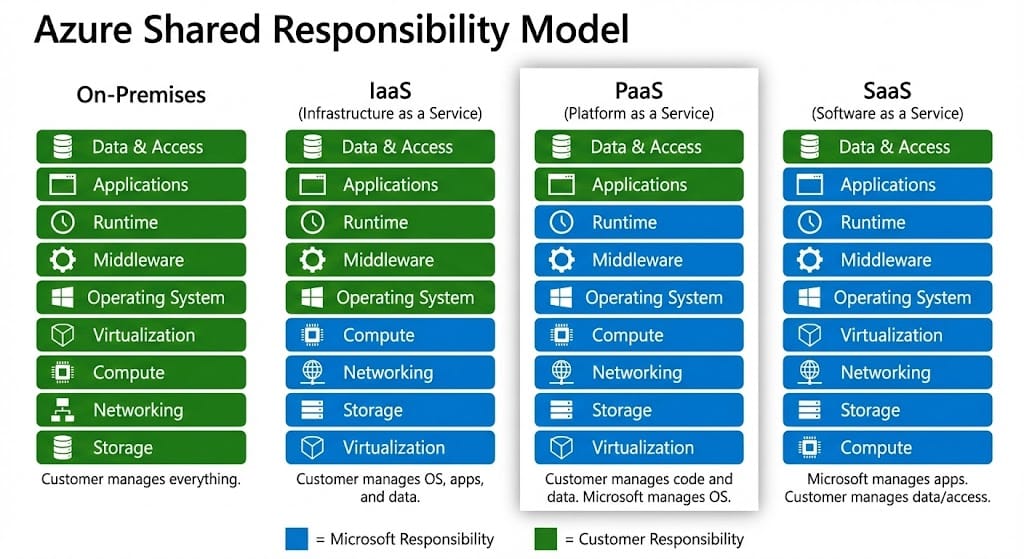
- IaaS (Infrastructure as a Service): Microsoft manages the hardware. You are still responsible for the Operating System (OS), patching, middleware, and data.
- PaaS (Platform as a Service): Microsoft manages the hardware AND the OS, patching, and middleware. You are only responsible for your application code and data. This minimizes your administrative effort.
- SaaS (Software as a Service): Microsoft manages almost everything, including the application. You are only responsible for your data and access.
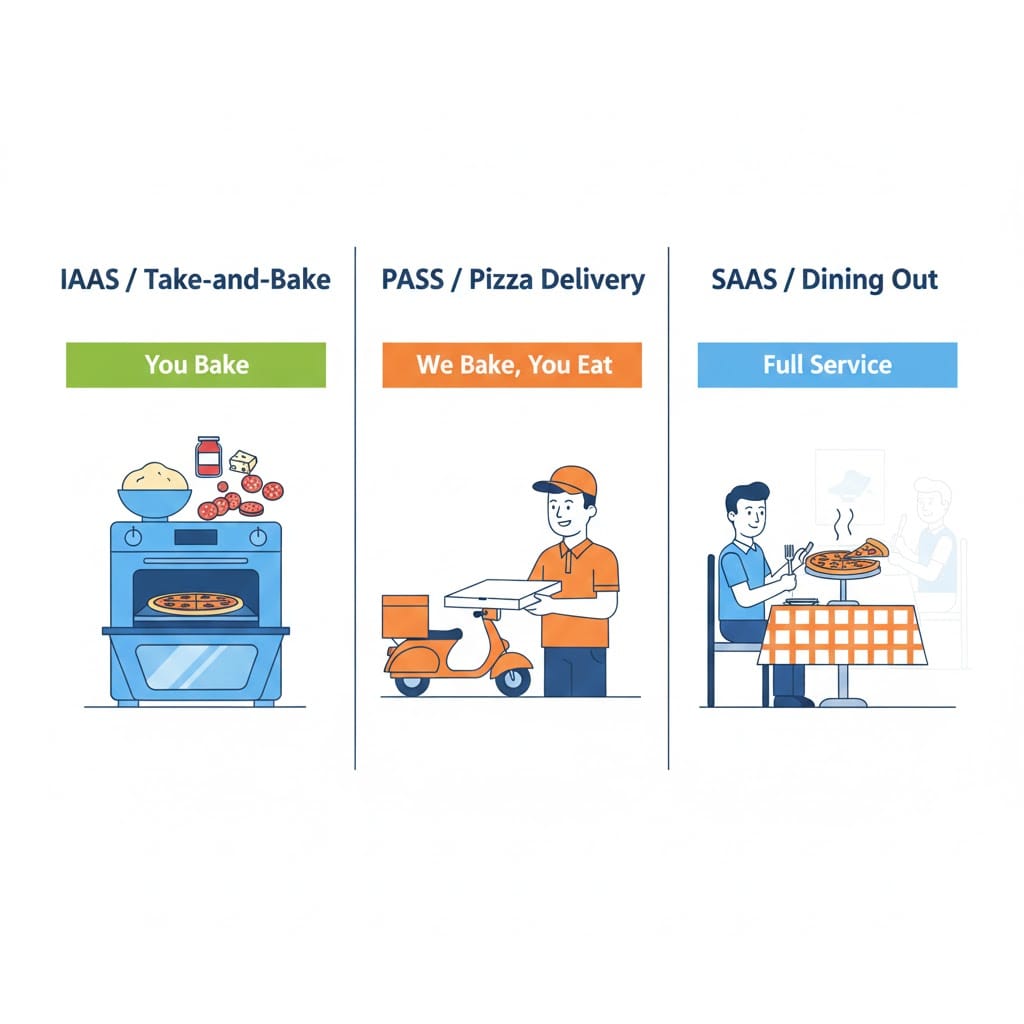
Visualizing the models using the Pizza Analogy.
In this scenario, the team wants to manage “Code and Data” but avoid “OS and Middleware.” This exact split corresponds to the PaaS model.
Option A (Infrastructure as a Service):
This violates the Administrative Effort Goal. In the Shared Responsibility Model for IaaS, the customer retains full responsibility for managing and patching the Operating System.
Option C (Software as a Service):
This violates the Custom App Requirement. While SaaS offloads the most responsibility, it does not allow you to host custom application code. You are consuming a finished product, not building one.
Option D (Serverless computing):
This is a Distractor. Serverless is a subset of PaaS. While it fits the responsibility model (no OS management), “Platform as a Service” is the broader, standard industry term for hosting custom web applications.
Goal: You need to recommend a cost model that allows the company to pay only for the computing resources they use while minimizing upfront capital investment.
The main financial difference between on-premises IT and Cloud Computing is how you pay for infrastructure. This choice determines your financial model.
- CapEx (Capital Expenditure): This is the traditional model. You spend money upfront on physical infrastructure. You buy servers, racks, and cooling systems before you ever use them. You own the asset, but its value decreases over time.
- OpEx (Operating Expenditure): This is the cloud model. You have no upfront costs. You pay for services and products as you use them. You are billed based on consumption, similar to a utility bill like electricity or water.
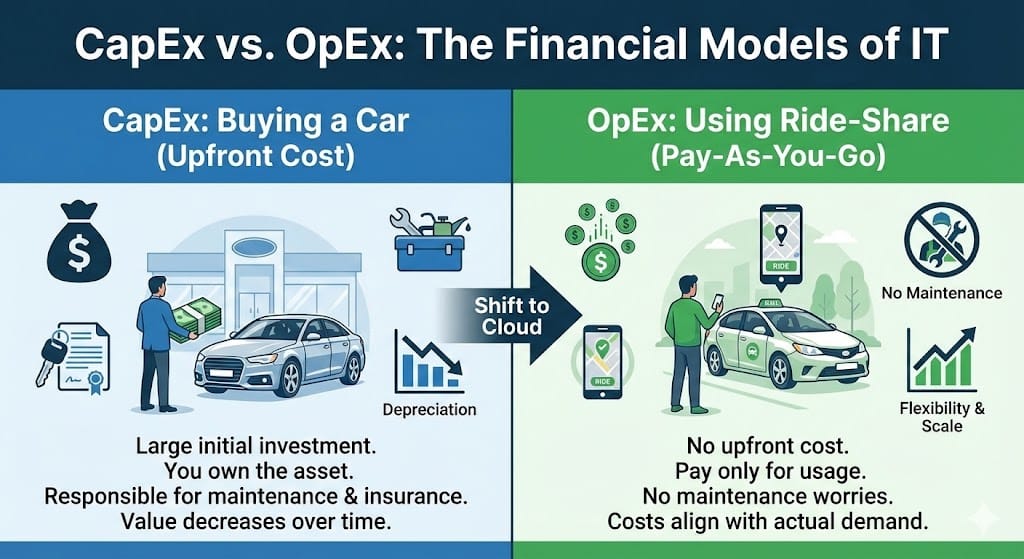
OpEx allows you to pay as you go, unlike CapEx which requires upfront payment.
Visualizing the models using the Car Analogy:
CapEx is like buying a car in cash. You pay a large amount upfront. You own the car, but you must pay for insurance and maintenance even if it sits in the garage.
OpEx is like using a ride-share service. You pay only when you take a ride. You do not worry about maintenance, insurance, or the cost of the car itself.
In this scenario, Tailwind Traders wants to avoid purchasing physical servers. This means they want to avoid CapEx. They want to pay only for the resources they use. This exact requirement defines the OpEx model.
Option A (Capital Expenditure):
This violates the Upfront Investment Constraint. CapEx requires spending money on physical servers before you can use them. The scenario explicitly states the company wants to avoid this.
Option C (Fixed pricing model):
This violates the Consumption Goal. Cloud computing is rarely fixed. It is variable based on how much you consume. A fixed price implies you pay the same amount regardless of whether you use the resources or not.
Option D (Reserved Instances):
This is a Distractor. Reserved Instances are a specific billing discount strategy where you commit to a one or three year term. While they save money, they are a specific purchasing option, not the fundamental accounting concept that replaces physical datacenters.
Goal: The solution must automatically add compute resources when demand increases and remove them when demand decreases. You need to ensure the application remains performant while minimizing costs during low-traffic periods.
These two concepts are often confused, but they have a distinct difference in cloud computing.
- Scalability: This is the ability of a system to handle increased load by adding capacity. It usually refers to long-term or planned growth.
- Elasticity: This is the ability to automatically scale resources in and out (or up and down) as needed. It focuses on dynamically matching resources to current demand to optimize costs.
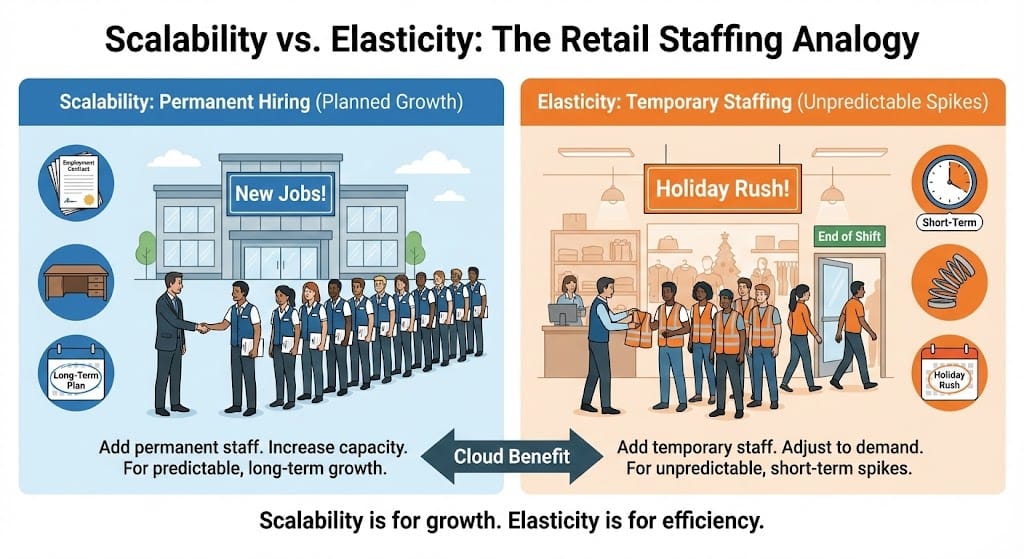
Elasticity adapts to spikes, while Scalability handles growth.
Visualizing the models using the Retail Staffing Analogy:
Scalability is like a store hiring 50 new permanent employees because the company is growing larger every year. This is a planned, long-term increase in capacity.
Elasticity is like a store hiring temporary workers just for Black Friday weekend. They work when the store is busy (high demand), and they leave when the rush is over (low demand). This handles short-term, unpredictable spikes.
In this scenario, the website experiences “unpredictable spikes” and must “automatically add and remove” resources. This dynamic adjustment to save money during low periods is the definition of Elasticity.
Option A (Scalability):
This is the Conceptual Neighbor. While the system is scaling, “Scalability” generally refers to the broader ability to grow. The specific term for *automatic* scaling that responds to *unpredictable* spikes (up and down) is Elasticity.
Option C (High Availability):
This is the Uptime Goal. High Availability ensures the application stays online if a server fails. It does not address adding or removing resources to manage performance or cost.
Option D (Reliability):
This is the Resilience Goal. Reliability is the ability of a system to recover from failures and continue functioning. It focuses on error recovery, not on performance sizing.
Question: Which responsibility is retained by the customer in this cloud service model?
In the Cloud, responsibilities are shared between the provider (Microsoft) and the customer (You).
- SaaS (Software as a Service): Microsoft handles the most. They manage the physical datacenters, the networking, the operating system, and the application itself.
- Customer Responsibility: You retain very few responsibilities, but they are critical. You are always responsible for your Data, your Devices, and your Identities (who has access).
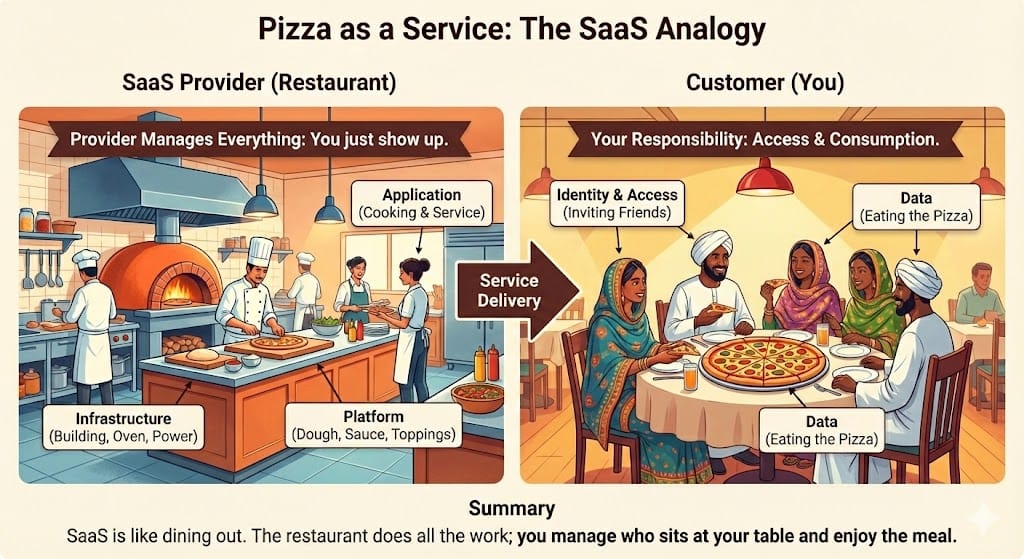
SaaS is like dining at a restaurant: You just enjoy the food (Data) and invite friends (Identity).
Visualizing the models using the Pizza Analogy:
IaaS is like “Take and Bake” Pizza. You buy the pre-made pizza (Infrastructure), but you must take it home, pre-heat your own oven (OS), and bake it yourself (Management).
SaaS is like Dining at a Pizza Restaurant. The Restaurant manages the building, the ovens, the electricity, the dough, the toppings, and the cooking.
Your Responsibility in SaaS: You just show up. You are responsible for inviting your friends (Identity/Access) and eating the pizza (Data). You do not cook, and you do not clean the dishes. In this scenario, Microsoft 365 is the restaurant.
Option A (Managing the physical network):
This is a Provider Responsibility. In the pizza analogy, this is the restaurant owner maintaining the gas lines and electricity for the ovens.
Option B (Patching the operating system):
This is a Provider Responsibility. In SaaS, you do not worry about the oven temperature. The restaurant (Microsoft) ensures the environment is perfect.
Option D (Maintaining the virtualization layer):
This is a Provider Responsibility. This is the kitchen infrastructure. You never step into the kitchen. You just enjoy the service in the dining room.
Goal: You need to recommend a cloud service type that allows the IT team to retain full control over the operating system and install custom software dependencies.
Cloud computing offers three main service models that determine the level of control and responsibility you have.
- IaaS (Infrastructure as a Service): This offers the most control. You rent the hardware but must manage the Operating System and installed software yourself.
- PaaS (Platform as a Service): This is for developers. Microsoft manages the hardware and the Operating System. You focus only on your application code.
- SaaS (Software as a Service): This is for end-users. Microsoft manages everything from the hardware to the application. You just use the software.
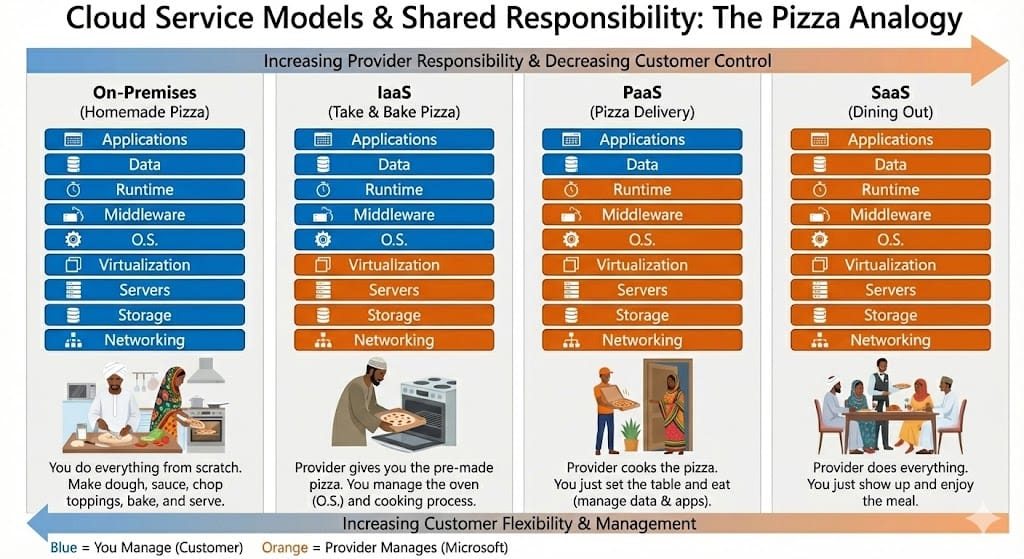
IaaS gives you control over the “Oven” (OS), while SaaS serves you the meal.
Visualizing the models using the Pizza Analogy:
IaaS is like Take and Bake Pizza. You buy the pizza, but you must bake it in your own oven. You control the temperature and cooking time (Managing the OS). You can add your own special spices (Custom Software/Registry edits).
PaaS is like Pizza Delivery. The restaurant cooks the pizza. You just set the table and eat. You cannot change how the pizza was cooked once it arrives.
SaaS is like Dining at a Restaurant. You go to the location, eat the food, and leave. You have no control over the kitchen or the cooking process.
In this scenario, the application requires “specific configuration of the operating system” and “access to the system registry.” This level of deep access is only available when you manage the oven yourself. This points directly to IaaS.
Option B (Platform as a Service):
This violates the Control Requirement. In PaaS, Microsoft manages the operating system. You cannot access the system registry or install OS-level dependencies. You simply deploy your code.
Option C (Software as a Service):
This violates the Customization Requirement. SaaS is a finished product like Outlook or Zoom. You cannot install your own custom legacy application inside a SaaS product.
Option D (Serverless computing):
This is a Abstraction Layer. Serverless removes the concept of the operating system entirely from your view. You upload code functions and they run. You have absolutely no access to the underlying OS or registry.
Goal: You need to recommend a compute solution that eliminates the need to provision or manage servers. The solution must minimize costs by charging only when the script is running.
Azure provides different compute models. The key difference is the balance between Control (how much you manage) and Convenience (how much Azure manages).
| Compute Service | Type | Management Responsibility | Billing Model | Matches Goal? |
|---|---|---|---|---|
| Serverless Computing | FaaS | None: Azure manages everything. | Pay per execution (only when running). | ✅ YES |
| Azure App Service | PaaS | Medium: Azure manages OS; you manage code. | Pay for the instance 24/7. | ❌ No |
| Azure Virtual Machines | IaaS | High: You manage OS, security, updates. | Pay per hour (even if idle). | ❌ No |
| Azure Dedicated Host | IaaS | Highest: You rent the physical server. | Pay for hardware 24/7. | ❌ No |
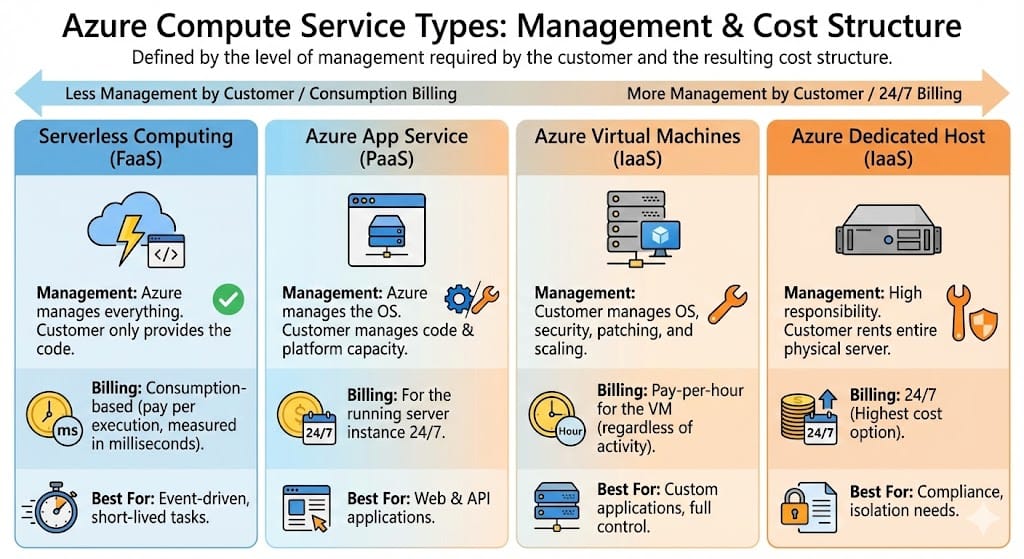
Visualizing the trade-off between Management Control and Cost Efficiency.
The scenario has two strict requirements:
- Eliminate server management: You do not want to patch or maintain an OS.
- Minimize costs (Consumption Billing): You only want to pay for the few seconds the script runs.
Serverless Computing (Azure Functions) is the only model that fits. It is event-driven (runs only when the image is uploaded) and fully managed.
Option A (Azure Virtual Machines): Violates both rules. You must manage the server, and you pay for it even when it is not processing images.
Option B (Azure App Service): Violates the cost rule. Even though it is easier to manage than a VM, you still pay for the underlying plan 24/7.
Option D (Azure Dedicated Host): This is the most expensive and complex option, designed for strict isolation, not simple scripts.
Requirement: The solution must provide automatic failover and minimize downtime. No manual intervention should be required during a datacenter outage.
These two concepts manage system failures but solve different problems:
- High Availability (HA): Focuses on Uptime. It ensures the system keeps running during a failure by using redundant resources (like Availability Zones) to provide automatic failover and minimal downtime.
- Disaster Recovery (DR): Focuses on Recovery. It is about restoring data and services after a catastrophic failure. This process always involves a gap in service (downtime).
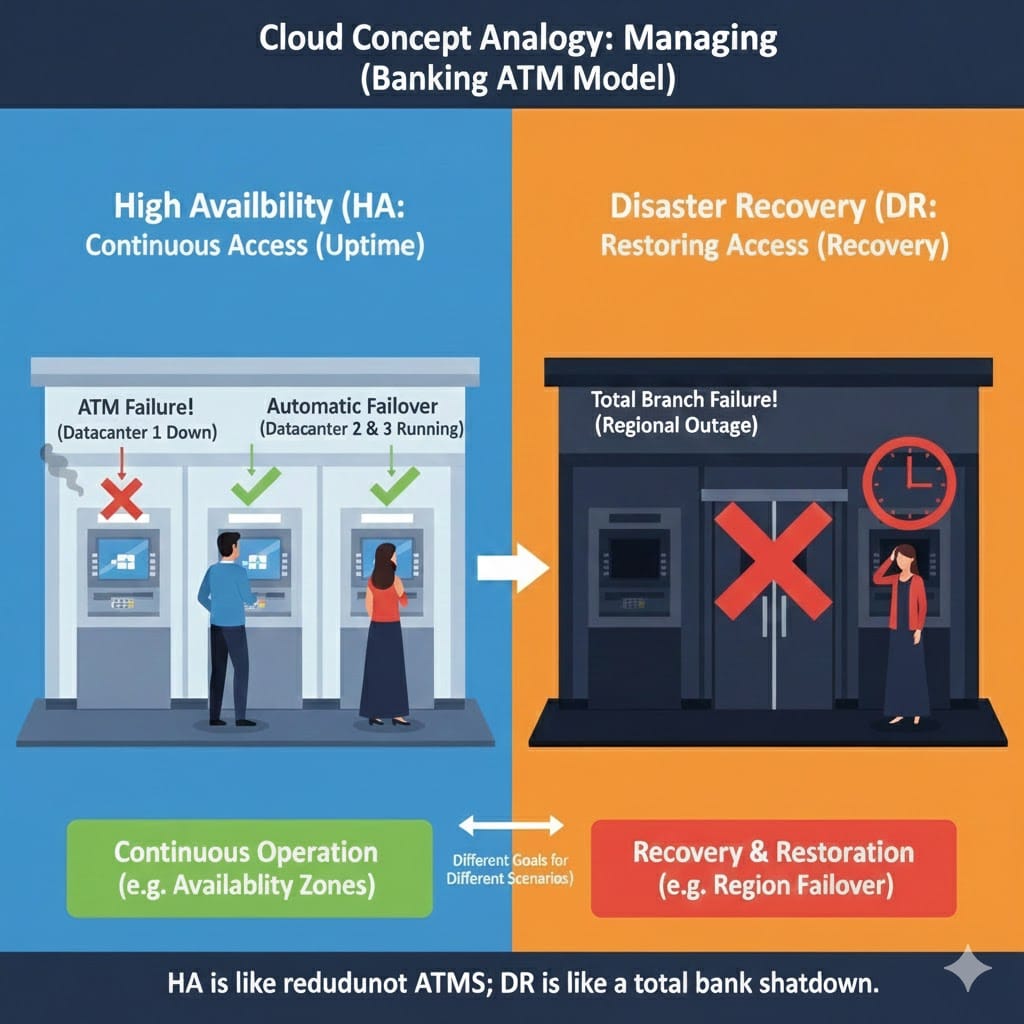
The ATM Analogy: Multiple machines ensure the service is continuously available.
Visualizing the models using the Banking ATM Analogy:
High Availability is like a bank ATM lobby that has multiple machines. If one ATM goes down (datacenter failure), the customer uses another immediately. The transaction completes without interruption.
Disaster Recovery is like the bank losing power to the entire branch. Service stops completely, and recovery must be manually initiated.
Since the goal is to “remain available” with “automatic failover” and “no manual intervention,” the solution must survive the outage instantly. This requirement is met exclusively by High Availability.
Option A (Disaster Recovery):
This violates the Minimal Downtime and Automatic Failover requirements. DR involves an outage and manual or automated steps to restore service.
Option B (Backup and Restore):
This is for data protection, not service availability. Restoring a backup takes time and results in significant downtime.
Option D (Scalability):
This is a Performance Concept. Scalability is about handling increased user traffic/load, not protecting against infrastructure failure.
Stay Updated
Join our mailing list to receive notifications regarding:
Az-900 Exam Practice Questions & Updates
Enter your email below to ensure you never miss essential Azure exam information.