Welcome to the AZ 104 Domain 5 practice questions page.
This page includes four carefully selected practice questions focused on Monitoring and Maintaining Azure Resources, an area where many AZ 104 candidates struggle because the exam tests judgment and tool selection rather than memorization.
These questions are written to closely reflect real exam scenarios and common Microsoft traps. To support your preparation, I have also included a YouTube video that walks through these same four questions step by step, explaining the reasoning behind each answer and why the other options are incorrect.
Alongside the video, you will find a clear infographic and written explanations to reinforce the concepts and help you build confidence for the AZ 104 exam.
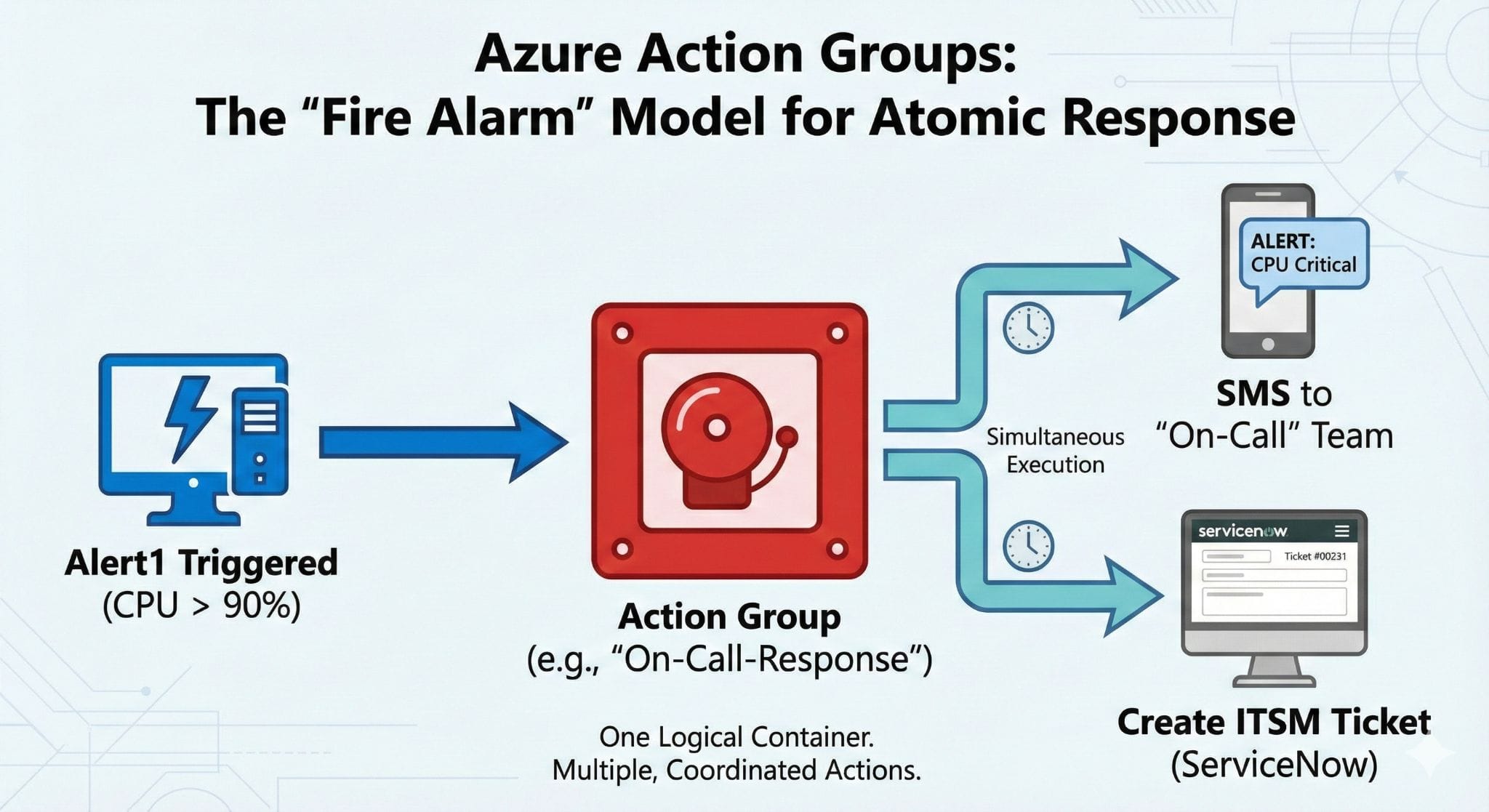
You need to ensure that when Alert1 is triggered, an SMS message is sent to the “On-Call” team, and a ticket is created in your ITSM tool (ServiceNow).
Think of an Action Group like a Fire Alarm System.
When a fire alarm triggers it performs multiple tasks at once. It rings the bell and flashes the strobe lights and automatically calls the fire department. You do not have separate buttons for each task. You have one system that broadcasts to everyone. In Azure Monitor an Action Group works exactly the same way. It is a single logical container that bundles multiple communication channels together. This architecture ensures an atomic response and keeps your administration clean.
The Core Concept
This approach involves creating distinct containers for each type of notification. You would have one group just for SMS and another group just for ITSM.
Why it doesn’t work here (Efficiency Mismatch)
This choice is incorrect because it creates administrative overhead. You must attach two separate groups to every alert rule. If you update the process later you might forget to update one of the groups. Best practice dictates bundling related actions together.
Analogy
It is like sending two separate letters to the same person. One letter contains the greeting and the other contains the message. It is inefficient and increases the risk of errors.
The Core Concept
A Webhook is a method for machine to machine communication. It sends data in JSON format to a specific URL endpoint to trigger an automated process.
Why it doesn’t work here (Capability Mismatch)
This choice is incorrect because a webhook cannot send an SMS to a human. Webhooks are designed for applications like Logic Apps or Azure Functions. The requirement specifically asks for a text message to a phone number.
Analogy
It is like trying to fax a document to a radio station. The technologies are incompatible for the desired output.
The Core Concept
Alert Processing Rules act as filters. They sit between the triggered alert and the Action Group. They are primarily used to suppress notifications during planned maintenance windows.
Why it doesn’t work here (Function Mismatch)
This choice is incorrect because these rules do not define the destination. They can stop an alert from sending but they cannot define who receives the alert or how it is sent.
Analogy
It is like a “Do Not Disturb” sign on a hotel door. It stops people from knocking but it does not tell the front desk who to call in an emergency.
Create and manage action groups in the Azure portal – Microsoft Learn
You need to recover the deleted backup data.
Think of Soft Delete like the “Recently Deleted” folder on your phone.
When you delete a photo, it does not vanish instantly. It sits in a special holding area for a specific time just in case you made a mistake. Azure Backup does the exact same thing. It holds your deleted backup data for exactly 14 days before permanently destroying it. This feature is turned on by default to protect you from accidental deletions or malicious attacks.
The Core Concept
Seven days is a common short retention period for some logs or temporary files in other systems. It is often the minimum setting for Key Vault soft delete.
Why it doesn’t work here (Duration Mismatch)
This choice is incorrect because Azure Backup has a fixed safety window. You cannot change this specific soft delete setting to 7 days. It is hard set to 14 days by the platform.
Analogy
It is like expecting a two week vacation but only booking a hotel for one week. The timeframes simply do not align with the rules of the hotel.
The Core Concept
Thirty days is the standard recovery window for Azure Active Directory objects. If you delete a user account, you have 30 days to restore it.
Why it doesn’t work here (Service Mismatch)
This choice is incorrect because different Azure services use different safety nets. The rules for User Identity do not apply to Backup Vaults. Backup uses a strictly shorter window.
Analogy
It is like trying to return a shirt to a store using the return policy of a different shop across the street. The 30 day rule belongs to the other store.
The Core Concept
Ninety days is the maximum retention period for Key Vault soft delete. It is also a common timeframe for long term log retention in storage accounts.
Why it doesn’t work here (Configuration Mismatch)
This choice is incorrect because it far exceeds the soft delete limit for backups. Once the 14 days pass, the data is gone forever. You cannot extend the soft delete state to three months.
Analogy
This is like waiting three months to ask for a refund when the receipt clearly says you only have two weeks. You have missed the window.
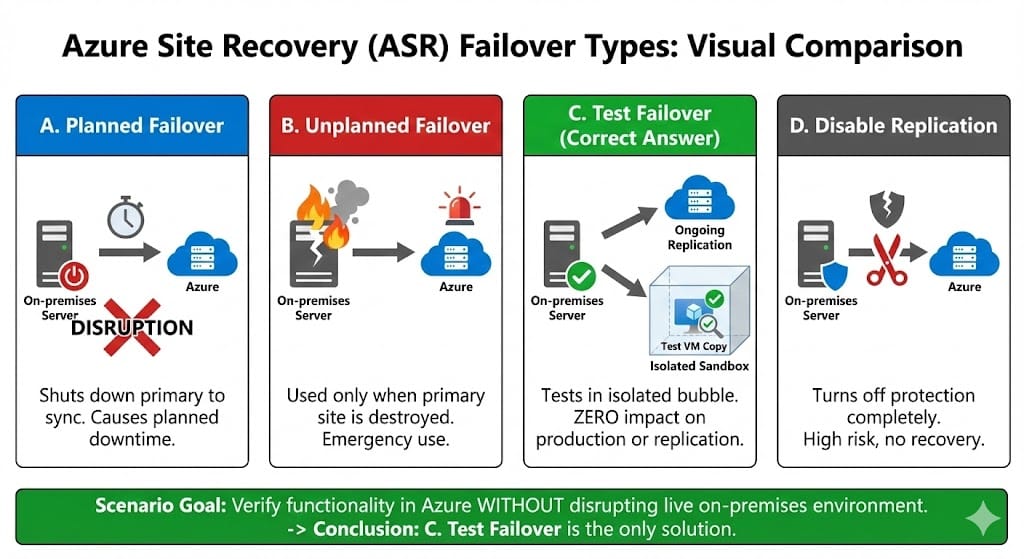
You need to verify that the application works correctly in Azure with no disruption to the running on premises production environment or the ongoing replication.
Think of a Test Failover like a Dress Rehearsal.
When a theater troupe practices a play before opening night they do not kick the paying audience out of the building. They practice in a separate room. Azure Test Failover works the same way. It creates a temporary copy of your server in an isolated bubble or sandbox network. Your real users keep working on the main system and the data keeps replicating in the background. It allows you to validate your plan with zero impact on business.
The Core Concept
First let’s look at Planned Failover. This tool is designed for actual migrations or strict scheduled maintenance. It deliberately shuts down your on premises machine to ensure absolutely zero data is lost during the move.
Why it doesn’t work here (Disruption Mismatch)
This choice is incorrect because the scenario specifically asks for no disruption. A planned failover stops production work. It takes the service offline for your users.
Analogy
It is like closing your entire store for the day just to check if the front door lock works. You lose customers unnecessarily.
The Core Concept
Let’s define Unplanned Failover. This is the emergency button. You press this when your primary office is actually on fire or underwater or suffering a massive power outage. It assumes the original site is already dead.
Why it doesn’t work here (Scenario Mismatch)
This choice is incorrect because your production site is currently healthy. You do not treat a routine checkup like a medical emergency.
Analogy
It is like deploying the airbags in your car while driving on a smooth highway just to see if they inflate. You only use that feature in a crash.
The Core Concept
Start by understanding Disable Replication. This action completely stops the protection service. It tells Azure to stop copying your data and often removes the relationship between the two sites.
Why it doesn’t work here (Goal Mismatch)
This choice is incorrect because it does not test anything. It simply leaves you vulnerable. It creates a dangerous gap where you have no backups and no disaster recovery plan.
Analogy
This is like canceling your car insurance to see if you are a safe driver. It does not prove anything and it leaves you at huge risk.
Run a test failover (disaster recovery drill) to Azure – Microsoft Learn
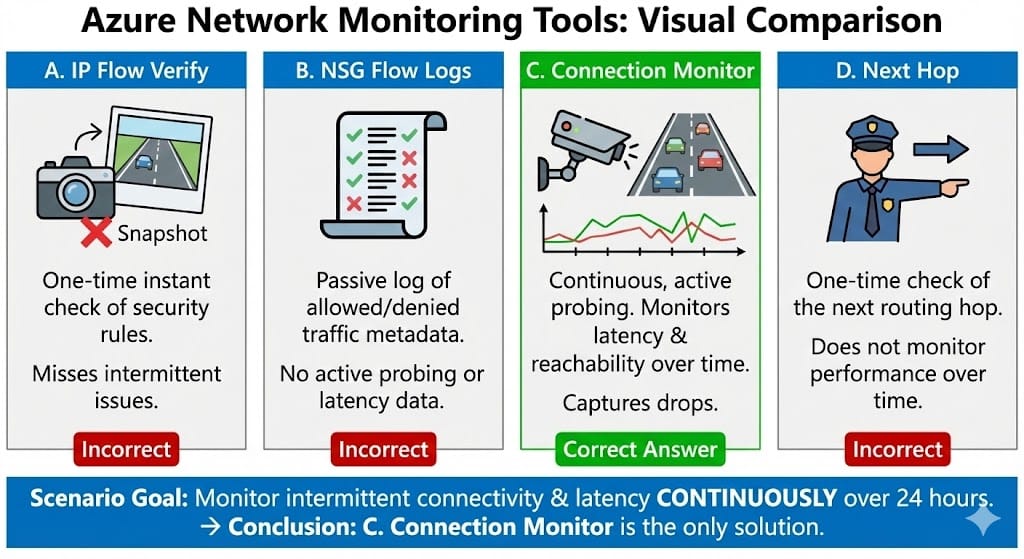
You need to monitor the latency and reachability between the VM and the Database continuously over the next 24 hours to capture the intermittent drops.
Think of Connection Monitor like a CCTV Security Camera.
A security camera records 24 hours a day. If a thief breaks in at 3 AM the camera catches it because it never stops watching. Connection Monitor works the same way. It installs a small agent on your VM that constantly sends test signals (pings) to your database. It builds a timeline of performance so you can look back and see exactly when the connection dropped or when it became slow.
The Core Concept
IP Flow Verify is a diagnostic tool that checks if your security rules allow traffic to pass. It looks at your configuration and gives you a simple Yes or No answer instantly.
Why it doesn’t work here (Time Mismatch)
This choice is incorrect because it is a point in time check. It checks the rules right now but it does not keep running in the background. It will miss any issues that happen five minutes after you run the test.
Analogy
It is like taking a single photograph of a highway. The photo proves the road exists but it cannot tell you if a traffic jam will happen later in the afternoon.
The Core Concept
Flow Logs act like a phone bill. They record metadata about every connection. They list the source IP and destination IP and whether the traffic was allowed or denied.
Why it doesn’t work here (Function Mismatch)
This choice is incorrect because it is passive. It records what happened but it does not actively test the connection quality. It cannot tell you the latency or how long a packet took to arrive.
Analogy
It is like looking at a call log. You can see that you called your friend but the log does not tell you if the audio quality was clear or static.
The Core Concept
Next Hop is a routing troubleshooting tool. It tells you where a packet will go next after it leaves your virtual machine. It helps you find misconfigured route tables.
Why it doesn’t work here (Scope Mismatch)
This choice is incorrect because routing is usually static. It does not fluctuate intermittently like latency does. Like IP Flow Verify this is also a one time check that does not monitor over time.
Analogy
It is like asking a police officer for directions. They tell you which way to turn right now but they do not ride in the car with you to report on traffic jams later.
Stay Updated
Join our mailing list to receive notifications regarding:
Essential Az-104 Exam Information
Enter your email below to ensure you never miss essential Azure exam information.